Oxyshield
A WordPress security plugin that scans, hardens and watches your site from inside wp-admin – no separate service to trust with your files, no monthly per-site fee for the basics.
One score, at a glance
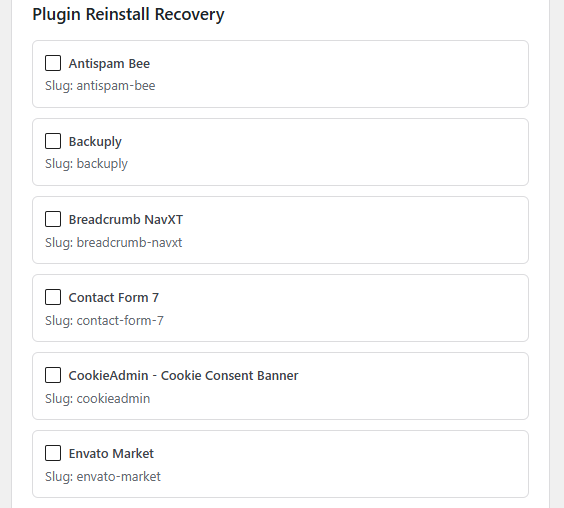
- A letter grade (A-F) and percentage, weighted so an active scan finding counts for more than an unchecked settings box
- Shows exactly how many of 17 hardening checks pass, and lists the top issues to fix first
- One click into a Guided Cleanup checklist that orders quarantine, core repair, vulnerable-plugin updates and config risks by priority
Vulnerability intelligence
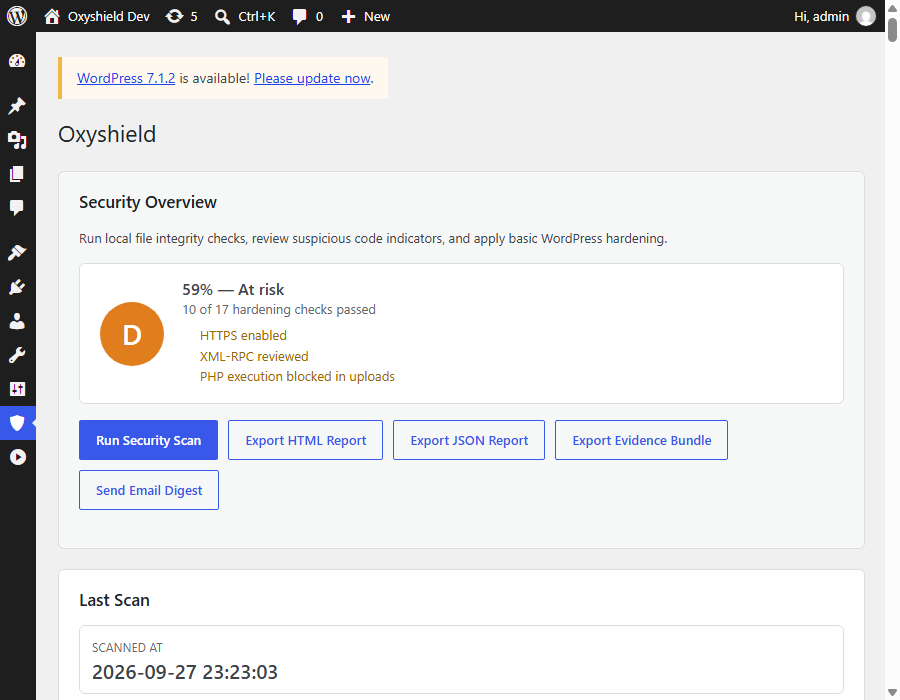
- Checks WordPress core, every installed plugin, every theme, and PHP itself against public vulnerability intelligence
- Shows the exact CVE, the severity, and the version that fixes it – not just "an update is available"
- One request per component, and your site's own URL is deliberately left out of the lookup
Firewall that explains itself
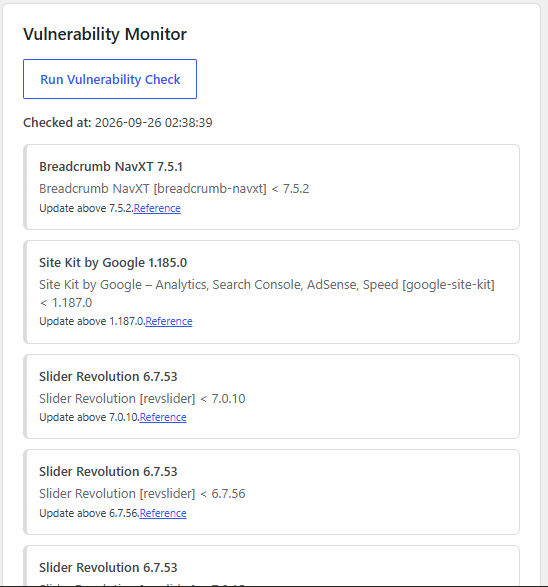
- Blocks common probes, bad user agents, SQL-injection and local-file-inclusion attempts, and author-enumeration scans before WordPress even renders the page
- Shows exactly what got blocked, why, and from where – not a black box
- Optional country blocking via Cloudflare, and an experimental early-load mode that runs before any other plugin's code, for sites that need it
If the worst happens, real recovery tools
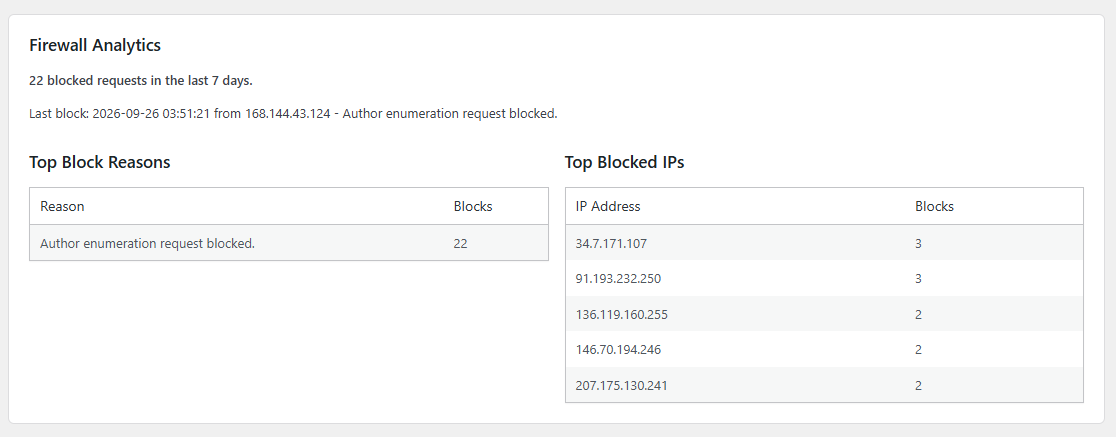
- One-click reinstall of any WordPress.org plugin or theme straight from the official source, to overwrite anything tampered with
- Force-logout every user, rotate security keys, reset admin passwords, or reinstall WordPress core itself, all from one screen
- Suspicious files go to a reversible quarantine vault, never straight to deletion, with an evidence bundle you can hand to whoever cleans up
A real audit trail
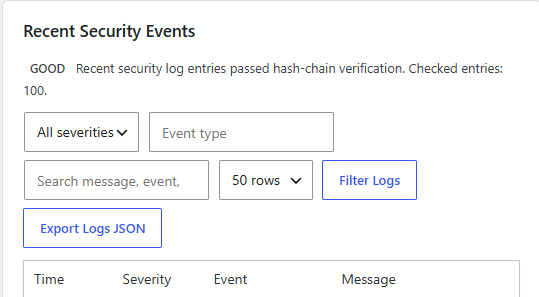
- Every login, plugin change, theme switch, user creation/deletion and update is logged, filterable and exportable to JSON
- The log itself is tamper-evident – hash-chained so a silent edit to a past entry is detectable, not just logged and hoped for
- Administrator activity is summarised separately, so a spike in privileged changes stands out immediately
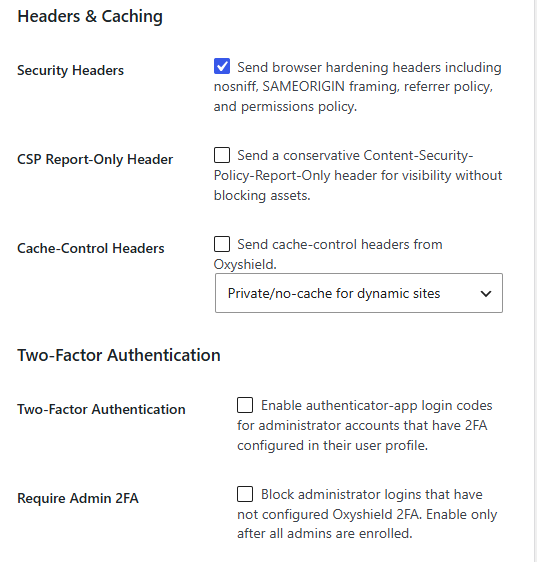
Hardening, headers and two-factor login
- Browser security headers (nosniff, frame protection, referrer policy, permissions policy) in one toggle
- Authenticator-app two-factor authentication for administrator accounts, with one-time recovery codes
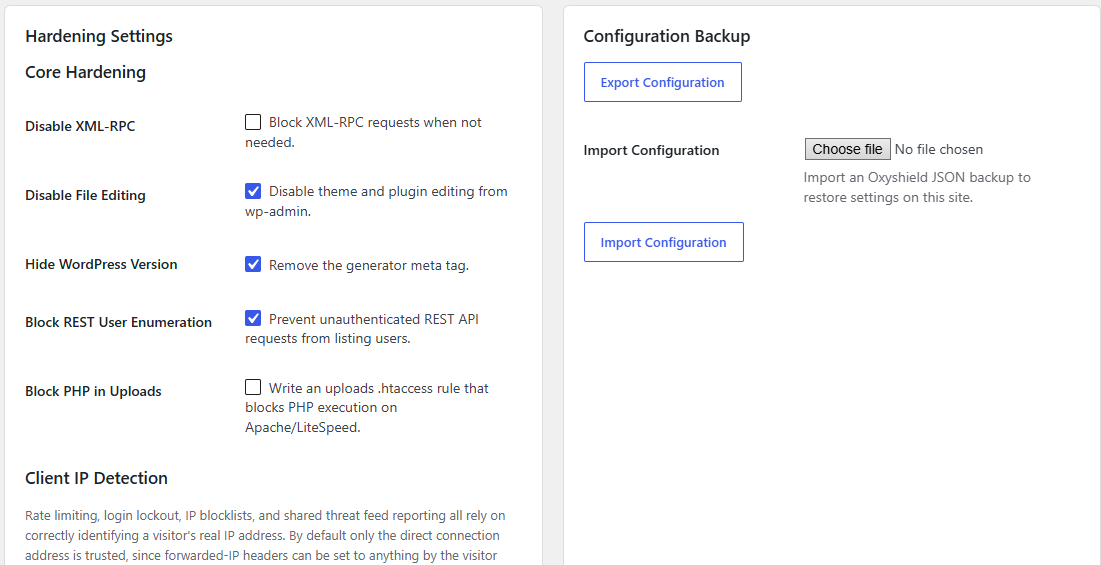
- XML-RPC control, hidden WordPress version, disabled file editing, and REST user-enumeration blocking
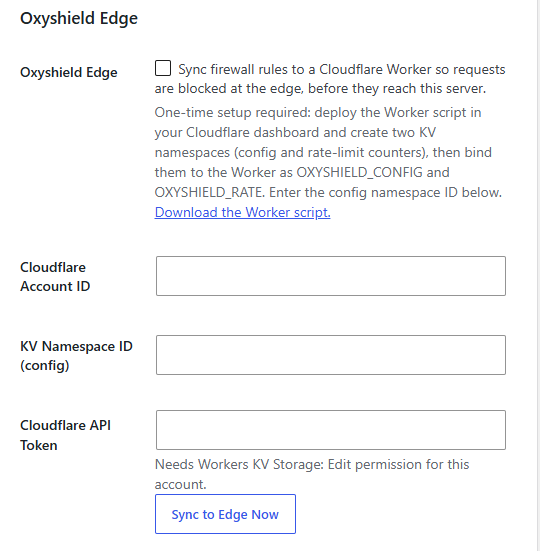
Block requests before they even reach your server
- Optional sync of your firewall rules to a Cloudflare Worker, so malicious requests are stopped at Cloudflare's edge, never touching your hosting at all
- One-time setup in your own Cloudflare account – nothing routes through a third-party server you don't control
- Country rules, rate limits and virtual-patch rules can all sync the same way
Configuration you can back up and restore
- Every hardening toggle in one place, with plain-English descriptions of exactly what each one does
- Export your whole configuration to a file and import it on another site in seconds
- Client IP detection is configurable, since rate limiting and lockouts are only as good as knowing who's really asking
What leaves your site: Oxyshield scans files locally and never uploads them anywhere. Depending on which features you turn on, it may contact WordPress.org (for checksums and updates), the public WPVulnerability API (component name/version only, never your site URL), and Spamhaus (a DNS lookup for your own domain’s reputation). Nothing else, unless you deliberately configure a remote rules feed, webhook, or Cloudflare integration yourself.
Getting started
What does Oxyshield actually do?
It runs security checks inside your own WordPress admin: file integrity monitoring, malware pattern scanning, a security score with a letter grade, login protection, a lightweight firewall, hardening settings, and recovery tools if something does go wrong. It works from inside your site, not as a hosted service you send data to.
Do I need any technical knowledge to use it?
No. Every setting has a plain-English description, the dashboard leads with one score and a Guided Cleanup checklist that tells you what to do first, and most protections (the firewall, core checks, security headers) are on by default.
Will it slow my site down?
The firewall and hardening checks that run on every page load are deliberately lightweight – pattern checks on the request, not full file scans. The heavier work (file integrity scans, vulnerability checks) runs on a schedule you control, not on every visitor’s page load.
Does it work alongside my existing security plugin?
Oxyshield is not a cloud firewall or network-level WAF, so it doesn’t compete with one. Most sites run it either on its own, or alongside a network-level service, for the file-integrity, recovery-tools and audit-logging side that a network firewall doesn’t cover.
Scanning & malware detection
Does Oxyshield remove malware automatically?
By default, no. It flags file changes and suspicious code for an administrator to review, because automatic removal can break a site when a scanner produces a false positive. You can optionally turn on automatic quarantine for a narrow, curated set of high-confidence rules (things like eval+base64_decode chains) – even then, files are moved to a reversible vault, never deleted, and you get an immediate email either way.
Does it send my site files anywhere to be scanned?
No. All scanning happens locally, inside your own WordPress install. Nothing is uploaded to an external scanning service.
How does it know a file has changed?
It keeps a hash baseline of your files and compares against it on each scan, and separately checks your WordPress core and plugin files against WordPress.org’s own official release checksums – so a modified file is caught even if your own baseline was captured after the tampering happened.
What about themes – are they checked the same way?
WordPress.org doesn’t publish official checksums for themes the way it does for plugins, so themes are covered by change tracking and signature scanning instead of a checksum comparison.
I saw some scanner code is base64-encoded – is that suspicious?
It’s the opposite of suspicious, if you know why: a malware scanner has to contain the literal patterns it searches for (like the text “eval” next to “base64_decode”), and antivirus/host-level scanners sometimes flag a security plugin as malware just because its own detection rules are written in plain text. The higher-risk built-in rules are stored base64-encoded and only ever decoded and passed to a pattern-match function – never executed. You can decode any rule yourself to see exactly what it checks for.
Firewall & hardening
What kind of attacks does the firewall stop?
Common request-level probes: SQL-injection attempts, local file inclusion, PHP execution probes, known scanner and exploit-tool user agents, and author-enumeration scans (a common first step attackers use to find valid usernames to target).
Will login lockouts block real users?
They can, if someone repeatedly enters the wrong details from the same IP. You control the attempt limit and lockout length, or can turn lockouts off entirely.
What is country blocking, and do I need Cloudflare for it?
Yes, it needs your site proxied through Cloudflare. Oxyshield reads the country code Cloudflare already attaches to each request – there’s no separate location database to keep updated, and no extra lookup per visitor.
What is "Oxyshield Edge"?
An optional sync of your firewall rules to a Cloudflare Worker you deploy yourself, so malicious requests get blocked at Cloudflare’s network before they ever reach your hosting. It’s a one-time setup in your own Cloudflare account – Oxyshield doesn’t route your traffic through anyone else’s server.
Is this a full firewall replacement?
No – it includes solid hardening and login protection, but it isn’t a cloud WAF or network firewall in the full sense of the term.
If something goes wrong
My site has already been hacked – can Oxyshield help?
Yes – that’s what the Post-Hack Tools are for: force-logout every user, email password resets, rotate security keys, reinstall WordPress core, and bulk-quarantine suspicious files, all from one screen, plus one-click reinstall of any WordPress.org plugin or theme straight from the official source.
What happens to a file once it's quarantined?
It’s moved to a protected vault folder, not deleted. You can review, restore, or permanently delete it from there once you’re sure.
Can I get a report to hand to someone else for cleanup?
Yes – downloadable HTML and JSON incident reports, plus a JSON evidence bundle, are built in for exactly that handoff.
Privacy & data
What data does Oxyshield store?
Settings, file hash baselines, scan summaries, vulnerability and reputation results, security logs, quarantine metadata, and administrator two-factor secrets – all in your own WordPress database. Quarantined files sit in a protected folder under wp-content.
Which outside services does it talk to?
Only what your enabled features need: WordPress.org for checksums/updates, the public WPVulnerability API for CVE lookups (sent as component type/slug/version only – your site’s own address is deliberately left out), and a Spamhaus DNS lookup for your own domain’s reputation. Anything beyond that (a remote rules feed, a webhook, Cloudflare Turnstile CAPTCHA, Oxyshield Edge) only ever activates if you turn it on and configure it yourself.
What happens to my data if I uninstall it?
Everything Oxyshield created is removed on uninstall: settings, scan baselines, stored results, the security log table, scheduled tasks, and the quarantine vault.